DNS Filter is breaking our WSL network interface

Our company has recently deployed DNS Filter across our Windows 11 estate. Shortly after this deployment our development teams, who work in a WSL2 Ubuntu environment starting experiencing network outages, sometimes on an hourly basis, requiring an entire restart of the WSL environment. This has significantly reduced the efficiency of the team. At first we thought the issue was relating to ThreatLocker, but after working with our IT team to disable various tooling for a couple of days at a time, we narrowed the issue down to DNS Filter. We saw another post recommending to switch WSL to mirrored mode, but this is not possible as we have a custom DNS solution within WSL for the product we are developing. During testing, we found that on DNS Filter start-up, the network interface for WSL stops working. We have not found a way to recover the network interface without a complete restart of WSL. Periodically, something within DNS Filter appears to cause the same problem while it is running, possible due to some kind of refresh. We submitted a change request to our IT team to disable DNS Filter for a month, which was approved. We have been running for 1 week now without any networking issues and the development team have been highly productive and significantly less frustrated than previous weeks. We are concerned that we will be back to this problem if we don't get a workaround before the end of November . I thought I would reach out to see if anybody else has experienced this issue? Is it possible to configure DNS Filter to ignore certain network interfaces? With custom DNS, the limitations of DNS Filter can be bypassed in the Linux environment anyway. Any help would be much appreciated.
-
Official comment
Hi Jonathan Drever, thanks for the detailed post! You’re right to connect this to how DNSFilter interacts with WSL2. The Roaming Client automatically restarts certain Windows services that WSL relies on, which can interrupt network connectivity (especially with custom DNS setups).
The good news: improved WSL compatibility is part of our upcoming v3.0.0 release, which is currently in development. You can follow our changelog to be notified of the release, and if your IT team has any questions they can connect with our Support Team for help!
-
Hi Minetta Gould,
Thanks for the quick response. Its good to know the team are working on improved compatibility for WSL, as that is our core development environment. We will keep an eye on the change log to see when we can re-enable with the latest build and re-test. Fingers crossed it resolves our issues.0 -
Jonathan Drever Just wanted to give you a heads up that the 3.0.0 Beta release went out today! Hope this new version works for your environment, but if anything comes up we encourage your IT team to open a request with our Support Team for help 💖
0 -

Hi Minetta,
We’re experiencing a similar issue with WSL2 where networking breaks whenever the DNS Agent service is restarted. This affects both our Ubuntu and Fedora WSL distributions.
I’ve tested version 3.1.0 beta, but unfortunately the issue still occurs.
You can reproduce the problem by running a continuous ping inside WSL2 while restarting the DNS Agent service on the Windows host. When the service restarts, the WSL2 pings begin returning “Destination host unreachable”, and the eth0 interface reports a linkdown status. It remains in this state until the host machine is rebooted.
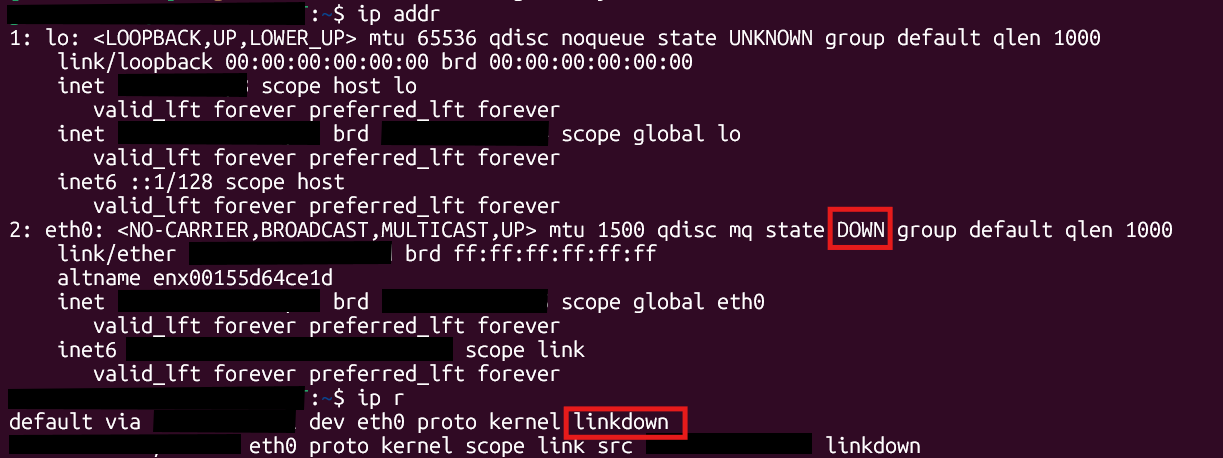 0
0 -
Hi Minetta,
I have also tried setting WSL2 to Mirrored Networking mode, as advised here, but we still lose our NIC when the DNS Agent service restarts.
Fixing WSL Connectivity Issues with Windows Roaming Client - DNSFilter Community
Thanks,
Graeme
0 -
Hi Graeme Smith, thanks for reaching out! As our support team shared earlier, our records indicate your DNSFilter subscription was purchased through a distributor partner, and per our agreement, their team handles support for marketplace purchases. If you haven't already done so, please open a request with them and include the details you’ve already gathered—they can assist directly or escalate to us if needed. Thank you for your understanding!
0 -

Good morning,
Do we know if there's a fix for this in the 3.x client? Also, when will the 3.x client be out of beta? Thanks!
Chris
0 -
Hi Chris Rios, thanks for reaching out!
Yes—the 3.x Windows agent series introduces DNS PreCheck, which handles DNS filtering differently than Classic mode. Agents using PreCheck do not experience the same WSL conflicts that can occur with the Classic DNS filtering approach, so that change should address the behavior discussed in this thread.
As for timing, the 3.x agent is still in beta, and we don’t have a confirmed date for when it will move to the Production channel yet. The best way to stay up to date is to follow our changelog, where we’ll announce when the release is promoted.
Thanks for checking in!
0

Please sign in to leave a comment.
Comments
8 comments